Vision
A brief guide to vision support in Featherless
Featherless supports sending images through the OpenAI-compatible chat completions API for vision-capable models. You can send images using either URLs or base64-encoded data, making it easy to integrate vision into your applications.
Important Notes
Vision requests are sent through POST https://api.featherless.ai/v1/chat/completions, using image content inside the message payload.
For best results, send the text prompt first, followed by the image content in the same message. If you are working with multiple images, send each image as a separate item in the content array.
To find supported models, use the model catalog and filter for vision support:
https://featherless.ai/models?modalities=vision
Quick Start
Using Image URLs
The simplest way to send images is using publicly accessible URLs:
from openai import OpenAI

client = OpenAI(
    api_key="your-featherless-api-key",
    base_url="https://api.featherless.ai/v1"
)

response = client.chat.completions.create(
    model="google/gemma-3-27b-it", # or any supported vision model
    messages=[
        {
            "role": "user",
            "content": [
                {
                    "type": "text",
                    "text": "What's in this image?"
                },
                {
                    "type": "image_url",
                    "image_url": {
                        "url": "https://example.com/image.jpg"
                    }
                }
            ]
        }
    ]
)

print(response.choices[0].message.content)
Using Base64 Encoded Images
For locally stored images, you can send them using base64 encoding:
import base64
from pathlib import Path
from openai import OpenAI

def encode_image_to_base64(image_path):
    """Encode a local image file to base64 string."""
    with open(image_path, "rb") as image_file:
        return base64.b64encode(image_file.read()).decode('utf-8')

client = OpenAI(
    api_key="your-featherless-api-key",
    base_url="https://api.featherless.ai/v1"
)

# Read and encode the image
image_path = "path/to/your/image.jpg"
base64_image = encode_image_to_base64(image_path)

# Determine the image format for the data URL
image_extension = Path(image_path).suffix.lower()
if image_extension == '.png':
    data_url = f"data:image/png;base64,{base64_image}"
elif image_extension in ['.jpg', '.jpeg']:
    data_url = f"data:image/jpeg;base64,{base64_image}"
elif image_extension == '.webp':
    data_url = f"data:image/webp;base64,{base64_image}"
else:
    data_url = f"data:image/jpeg;base64,{base64_image}" # Default to JPEG

response = client.chat.completions.create(
    model="google/gemma-3-27b-it",
    messages=[
        {
            "role": "user",
            "content": [
                {
                    "type": "text",
                    "text": "Describe what you see in this image."
                },
                {
                    "type": "image_url",
                    "image_url": {
                        "url": data_url
                    }
                }
            ]
        }
    ]
)

print(response.choices[0].message.content)
Finding Supported Models
Vision-capable models are available in the model catalog. If you want a quick way to inspect support, start here:
https://featherless.ai/models?modalities=vision
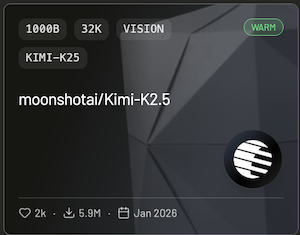
You can find supported models with a “Vision” tag:
Best Practices
Use clear, high-resolution images that provide enough detail for the model to analyze. Large images can increase request size and slow processing, so resize or compress them when possible.
When writing prompts, be specific about what you want the model to identify, describe, or compare. If you’re sending multiple images, include enough prompt context so the model knows how to interpret them together.
If you run into issues or have questions about vision support, visit our Discord community.